Thursday, August 30, 2018

What is launch padding for streamers?

What is launch padding and how are streamers doing it?

Launch padding is basically using specific games with high 3rd party embedding traffic to gain higher directory placement in new or more popular games.

launch paddingWhat are some games that are good for launch padding?

As of 8/30/2018 the day of this post, the following games in my opinion have the best launch padding potential.
  • Terraria
  • Ark
  • Minecraft
Some of the ways I have seen streamers exploit launch padding is by streaming game #2 and then when they finish broadcasting for the day, they then do reruns streams of game #1 (usually one of the games listed). Because viewership levels tend to drop during certain time zones and the amount of streamers also goes down, they are able to grab the top slot in game #1 directory and once that occurs the traffic from the embedding 3rd party boosts them. This is not always perfect but in general its works pretty well for some.

Or they stream game #1 until they grab the embedding traffic spike, then switch to game #2. A good example would be some people streaming Terraria, grabbing the embedding traffic and then switching to other games that have 'Twitch Drop' enabled like Warframe which further boosts numbers depending on directory placement.

If you have a big enough community, you can leverage this to possibly help with getting more exposure on the platform. But always keep in mind, 3rd party traffic is not something you control, it can end at any given moment.

Tuesday, August 28, 2018

Viewers in common analytics

Which channels have viewers in common with mine?

One of the newest pieces of analytics Twitch is offering to broadcasters is a top 5 viewers in common statistic. You can find this panel by opening up your dashboard, then going to the channel section under analytics on the left sidebar. There you should see a panel similar to this screenshot below, note I have censored the channels on this picture for a reason.

viewers in common


This section is extremely handy for determining possible co-streaming opportunities with other streamers on the platform. Try to reach out to channels in the list and see if you can work together in some fashion. Maybe even add these channels to auto host since the audience is similar.

Another interesting tidbit this panel is useful for is to determine streamers who are sending negativity your way via their viewer base. <--- Remember this line. If you find yourself wondering why so many chatters seem to have some agenda with what they are typing away, investigate this panel and see if these channels are talking about your channel.  In my situation, it easily pointed to a competitive mindset streamer who was indeed targeting my channel with negativity.
Thursday, August 16, 2018

Huge amount of follower bots are copying your stream channel name

Huge numbers of fake follower accounts have been created using channel names.

So overnight some entity has created thousands of Twitch accounts using streamers channel's name. Here is a screenshot of what it looks for one of my channels on Twitch.

fake channels on twitch


The format for the accounts appears to follow a pattern, its basically a streamers channel plus a random combination of one to three digits or letters. Some are also using pictures, avatars from established streamers in the profile.


Please be aware its not the channel owners doing it, if you get messages, alerts, /raids or whatever from channels that are following this format dont take it against the streamer.

Who exactly knows what the entity is planning on doing with all the fake accounts. Hopefully Twitch will investigate and remove these accounts from the system.

How to check if your channel was effected is by using the search function on the Twitch website.

Put in your stream name in the search bar and then click more on the channel section. Here is a screenshot to help you see where to click on to show more.

Again, be careful when clicking on things inside chat rooms, this entity maybe will try to post links with similar channel name to get viewers to click on them. It maybe a smart move to banned all accounts you find during search to prevent something like that from happening inside your chats.

Update - 8/19/2018

Checked to see if any of the new accounts have been removed for 'gamingwithdaopa' search and I still see a total of 30 or so fake accounts.  We are speculating the entity that is doing this account generation is trying to obtain 'free subs' from Twitch's new gifting option. I believe if they get a free sub, it may whitelist them inside that channel which will then allow them to post fishing links or other problematic links inside chat rooms.

It maybe time to prevent all URLs from being displayed in your chat unless its been reviewed by a moderator or channel owner. When reviewing links, pay attention to misspellings for domain names, and get a handle on URL shortener that will cloak links.
Monday, August 13, 2018

600,000+ Tune in for the start of Battle for Azeroth

At 6 PM Est time, the start of "World of Warcraft's - Battle for Azeroth" newest expansion launched and here are some screenshots of the numbers and top streamers on twitch!


Let start with overall viewers, it topped around 610,000 here is a screenshot from the Twitch directory.

world of warcraft bfa launch twitch
Click to enlarge picture.
With any large AAA Title, tons of streamers who usually do not play or stream world of warcraft all jumped in for the expansion launch. Here is a look at the top most streamers:

bfa top streamers list from twitch
Click to enlarge screenshot

Top  streamers for launch include the following:
  • sodapoppin - 84,750 viewers
  • Asmongold - 60,350 viewers
  • LIRIK - 31,170 viewers
  • ZeratoR - 29,728 viewers
  • TimTheTatman - 26,652 viewers
  • Reckful - 23,506 viewers
  • shroud - 21,415 viewers
  • AtheneLIVE - 16,513 viewers
  • Towelliee - 14,535 viewers
  • ungespielt - 7,612 vierwers

It is always amazing to see the viewership numbers for game launches like this Twitch. You can also view how much of a viewership hit some of these non wow streamers take by switching over to it for the launch window. As of 7:30 PM, overall viewership numbers have gone down to around 495,991 Viewers. I guess the core viewers are now busy playing the game and stopped watching streams.
Tuesday, July 31, 2018

Powerful Embedding Promotion

How embedding can be used to promote big events for your Twitch channel.

This past weekend Twitch had a major Overwatch League event and I noticed some of the various ways they used embedding advertising to promote the channel. For those of you who are not familiar with what embedding means its basically taking the channel video stream player and showing it externally outside of Twitch. A good example of embedding can be seen here on this blog, on the sidebar I embed my Twitch channel in the advertising section. You can also include chat as its own embed if you wanted to show that off.

So lets start with reddit, on numerous subreddits during the event they had a advertisement going which showed the stream as a embed. Here is a screenshot:

overwatchleague stream on reddit
This would show up as a reddit promoted post and as users went to the subreddits that had this advert going, they would be able to watch the stream inside of reddit.

Next up and most likely one of the best embedding options Twitch has in their portfolio is gamepedia. Here is a screenshot of the OverwatchLeague channel being embedding across the majority of the gamepedia wiki network.

overwatchleague stream on gamepedia
Even thou the event is over with that embed is still occurring which is extremely helpful when looking at how much channel views generation its generally doing. Lets take a quick look at some basic stats for this channel.

OverwatchLeague Stats, Followers, Views
The event took place on the 27th and 28th of July, on the screenshot I've added 2 black dots. Now look at what happened on Sunday, over 2 million views on a offline stream. And continued on to Monday another 1.2 million views mostly generated by Twitch's embedding of the channel on gamepedia. How interesting to see a big bulk of the views coming from embedding promotions outside of Twitch.


One more place that I've seen in the past Twitch used to promote a special event was on imdb. IMDB is owned by Amazon, its a movie-actor type of a database lookup website. I forgot to check to see if they had any promotional embed for the Overwatchleague channel.  But here is how they used it during a Call of Duty Black Ops announcement event.

Call of Duty Black Ops IMDB Embed

This was on the frontpage, top fold of the layout showing the channel as a embed.

Most likely they did additional promotion on facebook, twitter and other places but I didn't dig that deep. On facebook they do not allow 3rd party embedding, but on Twitter you can embed your stream.

Overall this shows how powerful embedding advertisement can be to promote your channel on Twitch. Check out my "How to get twitch viewers", guide for ways you can start taking advantage of embedding and other various tips that I have learned over the years of streaming.

Any questions or comments fill free to post below in the comment section.

Update 8/15/2018 - Noticed another embedded stream on r/twitch promoting Call of Duty, unlucky for them having a MATURE Filter enabled prevented the stream from autoplaying.

Here is a screenshot:


Additional examples of embedding, date of screenshots taken on 4/27/2021.


Alienware Arena embedding

Gaming.Lenovo.com embedding
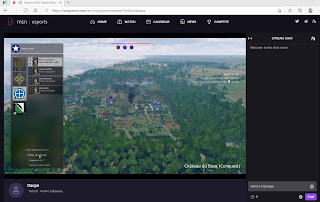
MSN Esports Hub embedding / aggrogator
Monday, June 25, 2018

Phishing scam streams

How to avoid getting caught in a phishing scam stream.

phishing scams live streamsSo no platform is safe from this type of a scam. A phishing scam is basically fraudulent attempts to obtain sensitive information like username, passwords and in the Twitch world of things it will include video game accounts and virtual goods.

I just recently hear of a Twitch viewer failing for a phishing scam. Here is what happened, they are fans of 'Old School Runescape' and noticed a streamer on Twitch with around 2,000 viewers playing that video game. This Twitch channel had a profile panel with information linking to a phishing website that looked exactly like the runescape forums.

So what happened was the viewer, checked out the Twitch's streamers profile, saw the link to what they thought was the official forums because the streamer wrote in the profile panel section they were quitting the game and giving away their items on the supposed linked forum thread. So the viewer thought oh cool, this streamer is giving away his stuff let me go check it out. So they clicked on the link that was in the profile, which was made to look exactly like the runescape forums. They put in their runescape account information and seconds later found themselves under a DDOS attack.  During that time frame their runescape gold, items were all stolen.

So here is what you need to always remember to prevent this exact sort of thing happening to you.
  • Do not click on any random links in chat, whispers or profile sections for channels.
  • Note even banners or streamer panels can have links pointing to external websites.
  • Preview All URLS by mousing over, if they are short URLs do not trust them at all.
  • If you trust the streamer and believe the links are ok, double check to make sure they are going to legitimate sites.  Sometimes hackers do extremely tiny changes to accounts such as changing out a link and just one link on a webpage leading to a phishing site.
  • Remember a old saying, if its to good to be true, it probably is, if someone is offering something as a giveaway or promotion that wants username information, emails and other things make sure to verify the legitimacy before supply any personal information.
Majority of phishing scam that occur on the twitch platform are basically private messages text offerings with shortURL links that go to phishing webpages. This was the first time I heard of a stream being used as a way to phish.


Do you know of any phishing attempts happening on the Twitch platform? If so please share them in the comments section below.

Embedding clips on twitter

Guide on how to embed twitch clips onto twitter.

So you want to put a twitch clip on twitter as a embed? Here is a simple way to do it by downloading the clip and reuploading it into twitter.  This method can also apply for facebook pages. So if you want to upload clips onto both twitter and facebook, substitute step 3 with posting on facebook, its very similar.


Step 1.

Go to the clips section on the dashboard and select clips of my channel.

Clips section on dashboard

Here is a URL shortcut ( https://dashboard.twitch.tv/u/STREAMNAME/content/clips/channel )  to this section, just make sure to insert your channel name in the STREAMNAME spot.

Step 2.

Click on the download button next to the clip you want to save. Make sure to save the video clip to a location you can easily find such as your desktop.

Clips download button

Step 3.

Now that you have your video clip downloaded, you can use it to upload into twitter, which will create it as a embed. Go to twitter, then to tweet creation window and click on 'Add photos or video' button, select the video clip file and upload it. Write out a tweet description with your hash tags and tweet it out.

twitter tweet window with video embed


Update - Twitch now has the correct twitter card information for clips, so it automatically embeds and links back to your twitch channel. You can use the clips URL and just put that into a tweet and it should work. So you will have to decide either on downloading and re-uploading or just using the share to tweet link.

I recommended to keep downloading your clips and then uploading them into twitter.  Using twitter's video system is better for growing and discovery opportunities on that platform. Social media platforms like facebook and twitter generally rank content better if its on their website, not embeds or links to other sites.