Friday, November 12, 2021

How to use the google/youtube ABC Method for discovery and keyword research!

Ever Wondered How Top Creators Always Know Exactly What Their Audience Wants?

Picture this. You type a single keyword into Google or YouTube, and within seconds you uncover dozens of real questions people are actively searching for right now. No paid tools. No complicated software. Just a free built in trick that reveals exactly what your viewers crave. That is the Google and YouTube ABC Method, and it is one of the smartest, most underused ways to spark fresh content ideas that actually get discovered.

Whether you are a streamer, YouTuber, blogger, or just getting started in your niche, this simple technique can hand you ready made topics with real search demand. It has been quietly powering content strategies for years, and it still works brilliantly in 2026.

What Exactly Is the Google ABC Method?

Google search bar has a powerful autocomplete feature that suggests popular searches based on what millions of people have already typed. The ABC Method takes advantage of that by using the alphabet as your guide.

Here is how it works. Start with your main keyword or topic, then add a space and the letter A. Google instantly shows you the most common searches that begin with that letter after your keyword. Swap A for B, then C, and keep going all the way through the alphabet. Each letter uncovers new phrases, questions, and long tail keywords that real people are using every day.

The beauty is that these are not random ideas. They are based on actual search behavior. That means the suggestions reflect genuine interest and intent, giving you a direct line to what your audience is looking for.

Example 1: Typing twitch a reveals popular searches people are making about the streaming platform.

Example 2: Continuing through the alphabet uncovers even more targeted ideas for content.

The ABC Method on YouTube: Same Idea, Video Focused Gold

YouTube search bar works exactly the same way, but the suggestions are tailored to what people are actually watching. Type your keyword, add a letter, and watch the platform reveal trending video topics, questions, and phrases that drive real views.

This is especially powerful for creators because YouTube prioritizes content that matches searcher intent. Ideas you pull from here often have built in demand and lower competition than generic topics.

YouTube autocomplete in action. Perfect for spotting video titles and series ideas your audience is already looking for.

Turning Alphabet Suggestions Into Actual Content

The real power comes when you take those suggestions and transform them into high value pieces. For example, twitch a might show twitch affiliate program or twitch app download. Turn those into:

  • How to Join the Twitch Affiliate Program in 2026: A Step by Step Guide
  • Best Twitch Streaming Apps for Beginners (Updated for 2026)
  • Or even a full video series answering every question the alphabet reveals.

You can go deeper by combining letters with question starters like how to, best, why, or what is. This naturally surfaces long tail keywords that are easier to rank for and more likely to convert into views, subscribers, and engagement.

Pro Tips to Get Even Better Results in 2026

Want to level up? Try these practical tweaks:

  • Use incognito mode. This removes your personal search history so you see cleaner, more universal suggestions.
  • Layer your keywords. Combine your main topic with niche modifiers (example: gaming pc a, stream setup b, etc).
  • Go beyond single letters. Once you have a strong phrase, add how to, vs, or 2026 to unlock even more specific questions.
  • Cross reference Google and YouTube. Ideas that appear on both platforms have massive discovery potential across search and video.
  • Track and organize. Keep a simple spreadsheet of the best suggestions. You will quickly build a content calendar that lasts months.

Many creators also combine the ABC Method with free tools like Google Trends or YouTube Analytics to double check search volume and seasonality.

Why This Method Gives You a Real Discovery Advantage

In a world where everyone is fighting for attention, the ABC Method helps you create content before the crowd catches on. By spotting trending questions early, you can publish videos, streams, or blog posts that rank higher and reach audiences when interest is peaking.

It works for any niche: gaming, tech, fitness, finance, you name it. The key is consistency. Spend 10 to 15 minutes running the alphabet on your core keywords every week, and you will never run out of fresh, relevant ideas again.

So go ahead and open a new tab. Pick your main keyword, type that first letter A, and watch the possibilities unfold. Your next viral video or top ranking blog post might be hiding right there in the autocomplete box.

Thursday, November 4, 2021

How legal viewbots thrive is a false narrative

The Truth About Twitch Embeds: Real Views or "Legal Viewbots"?

There's a persistent myth floating around the streaming world that has creators, analysts, and even some big-name YouTubers fired up. They point at certain channels and declare their viewer counts inflated by what they call "legit viewbots" or "legal viewbots." The culprit? Simple embeds of Twitch streams on third-party websites. But is that really the same as botting? Spoiler: it's not. And the double standard here is glaring.

Watch any of those viral breakdown videos and you'll see the same setup: They pull up the World of Warcraft Twitch directory, zoom in on Asmongold's massive numbers, and contrast them with smaller or mid-tier channels like Method. The claim? One is pure organic hype, the other is propped up by sneaky embeds. It's a neat narrative, but it's also flat-out wrong. Blanket judgments like this ignore how Twitch actually works and who benefits most from the platform's built-in visibility tools.

If we're being honest and following the logic these critics lay out, then a whole bunch of completely normal Twitch features suddenly become "viewbots" too. Think about it:

  • The front page carousel that pushes top streams to millions of eyes
  • Auto-hosting and hosting features that funnel viewers automatically
  • Raids that send entire audiences from one channel to another
  • Drops campaigns that reward viewers for tuning in

These mechanisms have helped build some of the biggest careers on the platform. The biggest channels didn't get there in a vacuum, and pretending otherwise misses the bigger picture.

Take Asmongold as a perfect case study. Back in one of his record-breaking streams a few years ago, he shared his dashboard stats publicly. The numbers were eye-opening.

Look closely at the stats breakdown and you'll see a massive chunk of views coming from "external" sources. According to the very logic some critics use, that should count as "legit viewbots." Yet no one bats an eye when it happens for the platform's biggest names. The truth is, external views have always been part of Twitch's ecosystem, and they still are in 2026.

Viewbots vs. Embeds: Two Completely Different Things

Here's where the conversation always goes off the rails. Critics love to mash these two concepts together, but they're apples and oranges.

A viewbot is automated software that opens fake connections to a stream. It tricks Twitch's player into thinking a real person is watching, pumping up the numbers without any actual human behind it.

An embed, on the other hand, is a real Twitch video player placed on a legitimate webpage. A real visitor lands on that site, sees the stream playing, and consumes the content just like they would on Twitch itself. No automation. Just genuine eyeballs.

Yet somehow these get lumped together in the same breath. It's misleading at best and harmful at worst, because it discourages the exact kind of cross-promotion that could help smaller creators grow.

Chat Activity, Followers, and the Real Story Behind the Numbers

Another favorite talking point: "Their chat is dead, so the viewers must be fake." This one falls apart fast when you understand how embeds actually work.

When a site embeds a Twitch player for promotional or content purposes, they almost never include the chat window. Why? Because the goal is usually clean video playback, not full social interaction. Visitors are still watching the stream in real time. They're just doing it without typing in chat.

That doesn't make the view any less valid. It just means the metrics look different. Content is still being consumed, and that's what matters for building an audience over time.

What Twitch Actually Says About Embeds in 2026

Twitch has clear, official rules around embedding their player, and they've held steady even as the platform evolves. Here's the current reality straight from their developer documentation:

Key requirements that still apply today:

  • The embedded player must be at least 400x300 pixels — no tiny 1x1 hidden frames allowed.
  • Embeds must use approved player elements and can't be obscured by other page content.
  • Domains need proper SSL certificates and the required "parent" parameter for verification.
  • You can't simply buy or sell embed placements on unrelated high-traffic sites unless you own and operate them. Twitch can (and does) revoke access for non-compliant use.

These rules exist to keep things fair and prevent abuse. But they also leave plenty of room for legitimate growth. A gaming blog, news site, or community forum can embed a stream and drive real, engaged viewers back to Twitch. It's the same model YouTube has used for years with massive success.

Why Twitch Needs More Smart Embeds, Not Fewer

Here's the part the critics miss: Twitch's growth depends on creators and partners building content around streams, not just inside them. Billions of web pages embed YouTube videos and send traffic right back to the platform. Twitch could use more of that same energy.

Quality embeds on relevant sites act like digital billboards. They expose streams to new audiences who might never browse the Twitch directory. They create discovery loops that benefit everyone from huge channels like Asmongold down to up-and-coming creators who finally get their shot.

Of course, there's a line. Hidden autoplay embeds on spammy pages or coordinated campaigns designed purely to game the algorithm cross into questionable territory. But painting all third-party embeds with the same brush ignores the real value they bring.

If you're a streamer wondering how to grow ethically in 2026, focus on creating content worth embedding. Partner with sites that align with your niche. Encourage fans to share your stream responsibly. And remember that sustainable growth still comes from authentic connection, not shortcuts.

The next time you hear someone dismiss a channel's numbers because of embeds, ask yourself: Are they really complaining about fake views, or are they just uncomfortable with how the platform actually levels the playing field? Real views from real people watching real content will always beat bots. And smart embeds help make more of those moments possible.

Want to dive deeper into spotting genuine growth versus shady tactics? Check out proven metrics guides and keep building content that deserves to be shared everywhere.

Thursday, September 23, 2021

Embedding gone wrong, watch out for this!

How a 3rd party website is using the Twitch embed player in a very wrong way. Going to showcase what you should look for if you ever notice any external source popping up in your analytics section on twitch.

You can see if any 3rd party websites are embedding your twitch stream on either the channel analytics page or the stream summary section. Basically, go to your Dashboard > Insights > Click on either Channel Analytics or Stream Summary.  Both have a section called "Where did my views come from?" which then has a link to "View details", make sure to click on that to see the data.

If all goes well you will get a page that has the following type of section:

views from outside twitch
"Views from Outside Twitch" lists domain urls that have a Twitch embed player showing your stream. If you see yourself receiving a massive amount of views from this section its probably worth some time to investigate the sites to see how they are using the Twitch embed code.

Here is something I recently noticed that was happening in the "New World" game directory from a 3rd party website.

2 Embeds, one hidden, one visible

This screenshot has been censored so the 3rd party website and the embedded Twitch streamer isn't viewable.  

If you go to this website right off the bat you will think nothing sketchy is occurring.   Its a guide for a mmorpg and under the main content is a Twitch embed player that is set to Autoplay=False which means its not auto playing the live stream as you enter the page.  

But this same webpage if you press F12 (which loads up DevTools on chrome) shows a different story. 

I have highlighted 2 twitch embeds on the screenshot.

The red highlight is a hidden iframe with a twitch embed everything code that is set to autoplay=true.

The blue highlight is the visible iframe with a normal just twitch video player embed that is set to autoplay=false.

Other notes, this website has some extra sketchy stuff with refreshing the ads and also the red highlight hidden iframe.  So every couple of second the Twitch embed everything iframe is being reloaded in the background hidden from the users who are consuming the content on this page.

A hidden iframe with a Twitch player embed is against the Twitch developer service agreement.

See the terms here: https://www.twitch.tv/p/en/legal/developer-agreement/

If you notice this happening to your stream channel via some 3rd party website, report it to Twitch.


So you have to ask yourself why is this 3rd party doing this?

This 3rd party appears to be using this tactic to advertise and possibly gain influence with streamers who are invested in New World.  

The 3rd party has a new world website that the streamers are using on their channel.

So they pick the channels that are showing off their New World site, embed it so that streamer is higher on the Twitch New World directory which then may lead to more people seeing their website which in terms generators more web traffic for them.

Twitch Developer Agreement - "You may not create embeddable experiences in exchange for any compensation (monetary or non-monetary, directly or indirectly) from a content provider on a site or service that the content provider does not own or operate."

If the streamer checks to see whats going on via their "Views from Outside source", and goes to the other non new world website that's promoting their channel, at first glance it will be the visible twitch player embed that is paused. These streamers most likely have no idea of the hidden iframe, some of them probably don't even know they are being embedded.

Additional note on this case.

  • The Twitch Embed Everything code, why do they use that in the hidden iframe? Well here is a super secret tip, because it effects Twitch algorithm for "recommended channels" vs just having a Twitch Video player.


Wednesday, September 8, 2021

Does IPAD have twitch?

No, IPAD does not have the Twitch IOS app installed by default.  In order to get Twitch onto your ipad you will have to go to the apple app store and install it.

Ipad twitch button

Follow theses simple steps in order to get the Twitch App on your Ipad!

Step 1:

Click on the App Store button

Click on app store button

Step 2:

Click on the search feature on the app store

click on search option

Step 3:

In the text box enter Twitch then press the search button

enter twitch in the text box then press search button

Step 4:

Press the "Get" button for the Twitch Live Game streaming section that is also noted as editors choice. See this screenshot to verify what the app looks like in its current form on the app store.

Press Get Button

Step 5:

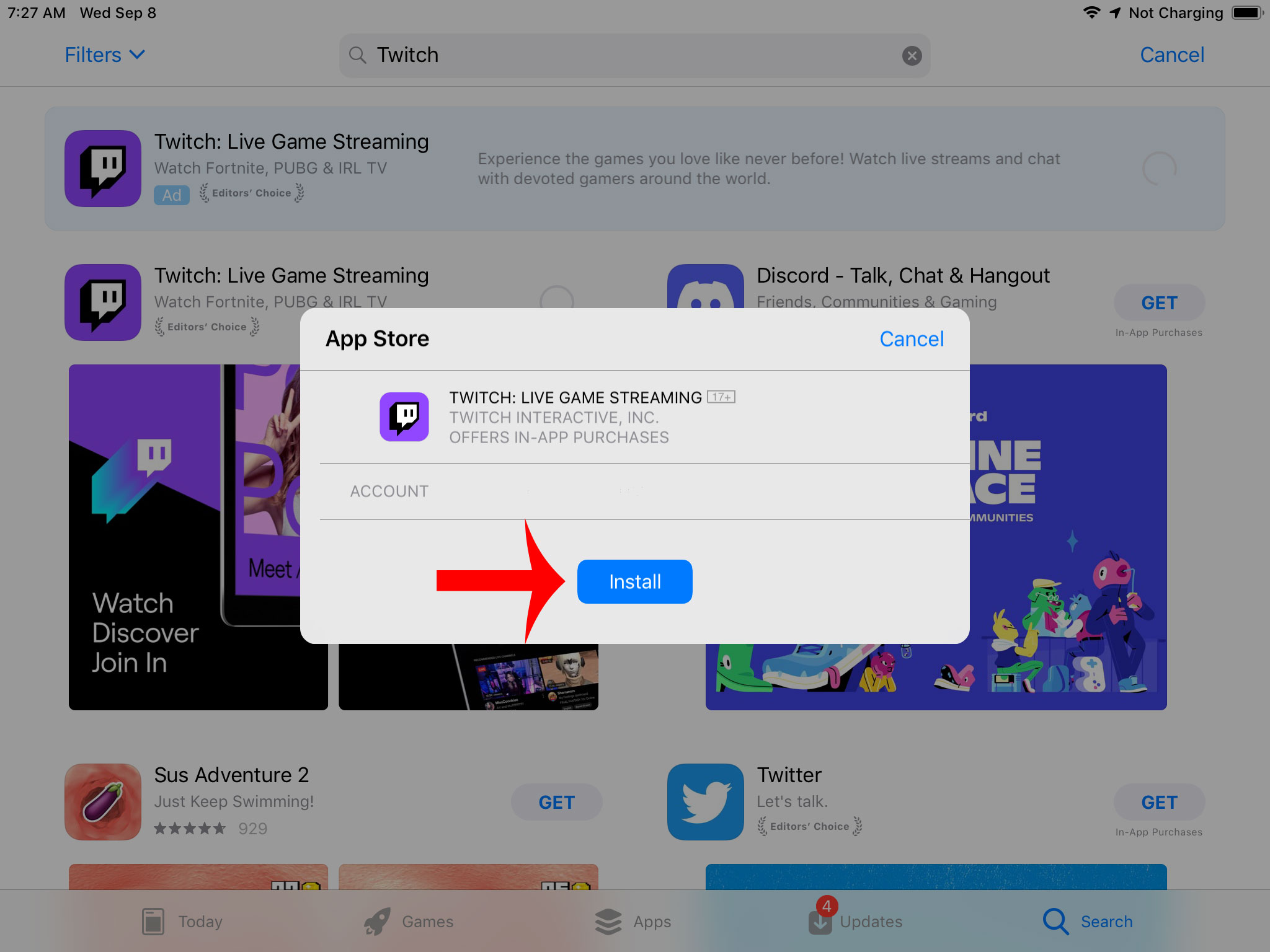
Press the install button

Press Install button

Step 6:

Once it finishes installing you can press the open button which will then start up the app.

Use Open button to start up twitch


Saturday, August 21, 2021

How to prevent hate raids, trolls using available tools from Twitch!

Shield Your Twitch Chat: The Ultimate 2026 Guide to Crushing Hate Raids, Trolls, and Spam

Imagine this. You are deep in the zone, laughing with your loyal viewers, cracking jokes, and building that perfect community vibe. Then bam. Your chat explodes with hateful spam, slurs, and coordinated attacks from bot accounts. It is the nightmare every streamer dreads. A hate raid or troll invasion can derail your entire stream in seconds.

The good news is Twitch has given creators more powerful built in tools than ever before to fight back. I have taken the best of the classic moderation strategies, verified them against the latest 2026 dashboard features, and added fresh insights including Shield Mode, phone verification, and smarter proactive defenses. Whether you are a new streamer or a seasoned pro, these steps will help you lock down your chat, protect your community, and keep the good vibes flowing.

1. Build a Bulletproof Blocked Terms List with Wildcards

Start by creating your own custom ban list of problematic words, phrases, and patterns. This is one of the fastest ways to stop trolls before they even get a foothold.

Head to your Creator Dashboard, click Settings on the left, then Moderation. Scroll down to AutoMod Controls and look for Blocked Terms and Phrases. Here you can add anything you never want to see in chat.

blocked terms and phrases

Pro tip: Use the wildcard asterisk * to catch variations. For example, *aaa*bbb*ccc* will block anything that contains that sequence no matter what comes before or after. You can also block spaces with patterns like * aaa * to catch sneaky attempts with extra spaces.

wildcard banned words

Do not forget to add your real name, address, phone number, and other personal info with wildcards. Set them to private. This stops doxxing attempts cold. Review and expand this list regularly based on what you see in your streams.

2. Activate Followers Only Mode to Stop Instant Spam

One of the simplest and most effective defenses is switching your chat to followers only mode. This means only people who have followed you for a set amount of time can type in chat. It instantly blocks brand new accounts and most raid bots.

You can enable it right from the chat settings cogwheel or use the command followers followed by a time such as followers 30m. In the dashboard under Moderation you will also find the full controls. Set the timeframe anywhere from minutes to months depending on how strict you want to be.

Watch your activity feed for sudden follow spikes with suspicious names. If you spot trouble, flip to subscribers only or emote only mode instantly. This gives you breathing room while you handle the situation.

3. Crank AutoMod to Maximum for Hands Off Filtering

AutoMod is your always on safety net. It holds suspicious messages for review instead of letting them hit the public chat. Set it to the strictest levels across all categories including the newer sexual harassment filter added in recent years.

automod max filter settings

Review held messages quickly in the Moderation Queue. You can approve good ones or let the bad ones stay blocked. Combine this with your blocked terms list for maximum coverage.

4. Require Verified Email and Phone Before Anyone Can Chat

Go to Dashboard then Settings then Moderation and find the Channel Privileges section. Turn on email verification or go even further with phone verification which was added specifically to fight bots and raids.

email verification

You can make verification required for all chatters, first time chatters, or accounts under a certain age in hours, days, or weeks. This single setting stops the vast majority of throwaway bot accounts in their tracks.

5. Add a Non Mod Chat Delay So Mods Can Stay Ahead

Give your moderators and bots a few seconds head start by enabling non mod chat delay. Set it to six seconds the maximum so problematic messages appear delayed for regular viewers but not for you or your team.

non-mod chat delay setting

Find this in Dashboard then Settings then Moderation under Chat Options. It is a lifesaver during fast moving raids.

The New Must Have: Shield Mode for Instant Lockdown

Twitch introduced Shield Mode a few years back and it has become the ultimate panic button for hate raids. One click or the shield command instantly applies a preset bundle of protections: followers only chat, email and phone verification, emote only mode, blocked hyperlinks, and more.

You and your mods can activate it from the channel page, Stream Manager, or Mod View. Customize your Shield settings once then flip it on the moment trouble hits. When the storm passes, deactivate it just as easily and return to normal.

Extra Smart Moves That Make a Huge Difference

  • Use the command uniquechat to stop duplicate spam messages. Turn it off later with uniquechatoff.
  • Set up hotkeys in your streaming software to instantly disable follower alerts, clear the chat with the clear command, or trigger a stream marker when a raid starts.
  • During any incident, drop a stream marker so you can review the VOD later, note usernames and phrases, and add them to your blocked list.
  • Keep your VODs unpublished by default. Go to Dashboard then Settings then Stream then VOD Settings and turn off Always Publish VODs. This gives you time to review and delete anything problematic before it goes public.
  • Check for and delete any malicious clips created during the chaos. You can also disable clip creation entirely in Stream settings if needed.
clear chat on twitch
stream marker button
how to unpublish vods

Final Thoughts: Stay Calm, Stay Consistent, Stay Safe

Hate raids and trolls thrive on chaos and reaction. By layering these tools blocked terms, verification requirements, AutoMod, followers only mode, chat delays, and Shield Mode you create multiple barriers that make your channel far less attractive to attackers.

Take a few minutes today to set everything up and test it. Build a quick panic button with hotkeys or a Stream Deck if you can. Most importantly, communicate with your community. Let them know you take safety seriously and that your chat is a welcoming space because of these protections.

You have worked hard to grow your channel. Do not let a few bad actors ruin the experience for the amazing people who show up to support you. With these updated strategies you can stream confidently knowing you are ready for whatever comes your way.

Stay safe out there and keep creating the content you love.

Thursday, July 15, 2021

Stream Summary from one of the biggest channels on Twitch - Asmongold

So recently one of the biggest channels on Twitch shared their stream summary page.  Asmongold was showing how much viewer traffic he received during his first final fantasy stream session.  It shows something very interesting that most people will never be aware of because normally the big streamers would never show these stats to the public.

Any how here is the screenshot of the stats for that day!

Asmongold Stream embedded on 3rd party websites

If you see the note I added to the screenshot in red, over 1.15 million views possibly came from external which is 3rd party embedding. That is almost 50% of total views from 3rd party embedding which is enormous.  You can see from the screenshot that they didn't include the external section that is under the "Channel" views on the stat page.
  • How to get twitch viewers - guides on everything you need to get your channel going and also has info on embedding, which as you can see is something that benefits even the biggest channels on Twitch.
Tuesday, June 15, 2021

How to block random channel gift subs

Tired of Random Gifted Subs Showing Up for Channels You Never Watch?

If you're a regular Twitch viewer, you've probably experienced this at least once: a notification pops up out of nowhere saying someone gifted you a sub to a channel you've never followed, never visited, and have zero interest in. It feels random, a little intrusive, and it clutters your inbox with stuff that doesn't matter to you.

The good news? Twitch built in a simple, official setting years ago that lets you stop this completely. It's still working perfectly in 2026, and it takes less than a minute to enable. Once it's on, you'll only receive gifted subs and memberships from channels you actually follow. No more surprise notifications from strangers.

block random channel gift sub

Why Gifted Subs Happen in the First Place

Streamers and big gifting events often hand out subs to random viewers in the chat to boost engagement or celebrate milestones. It's generous, but it can backfire when those random gifts land in your notifications for channels you don't care about. The setting we're about to turn on quietly blocks those while still letting you enjoy gifts from the streamers you actually support.

How to Block Gifted Subs on Channels You Don't Follow (Desktop)

Follow these four quick steps on your computer or laptop:

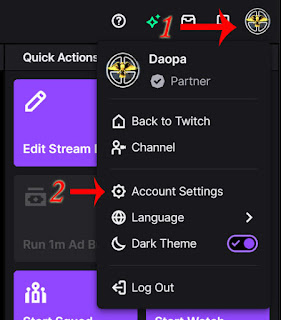
Step 1: Log into your Twitch account and click your profile picture in the top right corner. A small menu will appear.

Step 2: Select "Settings" from that menu.

how to get to account settings on twitch

Step 3: In the Settings page, click the tab labeled "Security and Privacy."

Step 4: Scroll down until you see the section called "Block Receiving Gifts on Channels You Don't Follow." Flip the toggle to On.

block receiving sub gifts

That's it. Twitch will instantly apply the change, and future gifts from unfollowed channels will be blocked automatically.

Does This Work on the Twitch Mobile Apps?

Absolutely. The process is almost identical on both Android and iOS:

  • Tap your profile icon (bottom right on mobile).
  • Go to Account Settings.
  • Tap Security and Privacy.
  • Scroll to the same "Block Receiving Gifts on Channels You Don't Follow" option and enable it.

The setting syncs across all your devices, so one change covers everything.

What You Should Know After Turning It On

This setting only affects channels you don't follow. If a friend or a streamer you already follow gifts you a sub, you'll still receive it normally. You can always turn the toggle off later if your preferences change.

Pro tip: While you're in the Security and Privacy tab, take a quick look at the other privacy options. Many viewers also enable two-factor authentication and adjust whisper settings for extra peace of mind.

Why This Small Change Makes a Big Difference

Turning on this feature keeps your notifications clean, reduces inbox clutter, and makes your Twitch experience feel more personal and intentional. No more random distractions from channels that don't interest you. You'll focus on the creators you actually enjoy and support.

If you've been dealing with unwanted gifted subs for a while, give this a try right now. It really does make a noticeable difference.

Have questions about the setting, or did it work differently on your account? Drop a comment below and I'll help sort it out.