Monday, June 8, 2020

Streamers served with DMCA notices for copyright music

Over the past weekend a big influx of DMCA requests have been served to Twitch.tv.  Many streamers both large and small have been given notices that they have clips on Twitch that contain copyrighted music.


Here is a recap of events around this issue from the past to the present:
    DMCA report from Twitch.tv
  1. In 2014, Twitch created audio fingerprinting filters using a 3rd party to mute out copyright related issues from videos to protect Twitch, which also protects streamers engaged in using audio that they shouldn't be using.
  2. Streamers who engage in using audio they shouldn't be using, thought they were safe.
  3. The copyright agencies that use monitors found out twitch clips past a certain year didn't filter out audio such as videos do. So they used automation to scan old clips and find audio fingerprints that match their music database.
  4. DMCA for old clips where then triggered based on fingerprint matching and sent to Twitch.
  5. Twitch notified all channels of the DMCAs.
  6. Many streamers who have been using copyright music are now deleting all their clips. Other streamers who are not up to date on all of this are just deleting all their clips as a safety precaution.
What is the take away from this weekends event for streamers?

It is pretty simple, do not use copyright content, music or audio that you do not have permission or license to use.
  • Majority of all games have settings to disable music, get in the habit of doing this before you start any new game for streaming on the platform.
  • Check with the games EULA/Youtube Policy/Video Policy to see if they have sections for streaming the game and monetizing it. Most games have this already inserted, but its always best to verify.  Also note, that EULA's can change, one day it maybe ok and another day maybe removed.
  • Do not follow on what others do on the platform and think its ok since "everyone" is doing it. 
  • Do not use any sort of main stream music in your broadcasts with out licenses or permission.
  • DO NOT THINK JUST BECAUSE TWITCH AUTOMATICALLY MUTES YOUR VIDEOS THAT YOU ARE SAFE TO CONTINUE TO USE MAIN STREAM MUSIC OR OTHER COPYRIGHT STUFF IN YOUR BROADCAST. Read this line 3 times to get it saved in your head!

Need more info on copyright law? Check out this past Twitchcon panel that goes over all the basics formatted for streamers.

Additional Information from djWHEAT interview with Noah Downs:


Quote: "There is a company out there that is monitoring most streams on twitch" - "They have the ability to issue live DMCA's but just havent done it yet."


Update 11/6/2020

A lot more issues with DMCA and clips have been occurring on the platform. Many additional streamers are getting banned for clips from long ago stream sessions. And there is additional issues with clips supposedly not totally being deleted from the system that maybe getting detected even though streamers have been mass deleting clips and videos.

Wednesday, June 3, 2020

How to watch twitch on Roku, 3 methods available!

If you have a Roku device for your tv and want to watch twitch streams, here are 3 possible solutions to that problem! In this short guide we will be using unofficial apps that allows you to watch twitch channels.

Watch Twitch on Roku

First Method using access code

  1. Open up your web browser, and go to the following url:
  2. Sign into your Roku Account
  3. Then a text box will be available where you can input a channel, write the channel named Twoku
  4. Warning window will appear, press OK to continue.
  5. Press Yes to add channel to your Roku account.
  6. Restart your Roku and you should then see Twoku channel which is a basic interface showing the Twitch directory, live stream list and streamer search.

Second Method via manual developer install

  1. Enable developer mode for Roku
    • Full detail guide on how to enter developer mode can be found here: https://blog.roku.com/developer/developer-setup-guide
  2. Login to your Roku via private IP address listed in step 1, example http://192.168.x.x
  3. Use this repo zip and upload it into the Roku Development application installer
    • Repo file is from https://github.com/worldreboot/twitch-reloaded-roku
  4. Press install
  5. Once installed, you should be able to find a channel with a black roku dev graphic at the end of your channel list. Click on that and it will start up the UI that shows the Twitch directory, live streams and search function.

Third Method via Web Video Cast app

  1. Start up google play in your Roku and search for web video cast
    • https://play.google.com/store/apps/details?id=com.instantbits.cast.webvideo
  2. Install that app and then use it to browse twitch.tv
Friday, May 1, 2020

Drops

Twitch Drops is a feature that allows Twitch viewers to earn in-game rewards by watching streams of certain games on the Twitch platform. Twitch Drops are typically offered as part of promotional events or game releases, and they are a way for game developers and publishers to incentivize viewership on Twitch.

To participate in Twitch Drops, viewers need to link their Twitch account to the game publisher's account. This is usually done by going to the game publisher's website and following the instructions to link your Twitch account. Once your account is linked, you can watch eligible streams on Twitch to earn Drops.

The Drops that you can earn vary depending on the game and the promotion, but they can include things like in-game items, currency, or even access to beta tests or early releases. To receive the Drops, viewers need to make sure that they are logged in to Twitch and that their account is linked to the game publisher's account.

It's important to note that not all games or events on Twitch offer Drops, and eligibility requirements may vary. To find out more about Twitch Drops, you can visit the Twitch website or check the website of the game publisher offering the Drops.

Twitch drops is a way for game developers to reward viewers who are watching streamers showcasing their game on the platform. The developers have many powerful options and ways to utilize the drops system from Twitch. They can whitelist a certain list of streamers that will be drops enabled or have all channels that are broadcasting their game have drops enabled.  If they choose all channels, their game on the twitch directory will have a special symbol the upper corner.

Here is a example of what the game directory will show for games that are drops enabled for all channels.

legends of runeterra drops

For viewers to be able to get drops, they will have to link their twitch account with the game account. After viewing a channel for a certain time frame or if a streamer does something unique in-game, they will receive a in-game item.  Please note, drops system has many ways to reward, make sure to check with the game developer and ask the streamers on how the drop works for the particular game.


My opinion:
From a streamer point of view, drops for a game your streaming is a huge positive due to the potential to have audience stick. Drops is such a powerful loyalty gimmick, that top view count streamers can go into rebroadcasting past stream sessions and still hold their audience as if they were live.

rebroadcast legends of runeterra


This maybe one instance where "content isn't king, the gimmick is everything". Each time I check the game directory for "Legends of Runeterra," I have seen a streamer named DisguisedToast have around 25k to 30k viewers while listing in title as "rebroadcast." Hardly any other streamer on the Twitch platform gets 25k viewers as "Live" yet this channel has been doing it daily as "rebroadcasts".

Update 4/14/2020 - New drop feature for a game called Valorant has gone live on the platform for over one week now. Riot games has enabled drops for a tiny segment of twitch channels, in which viewers have a chance to get a key for the closed beta. Small pool of Twitch enabled drop channels and a small chance to get a key for the game has turned out extremely successful for getting high concurrent viewers for this event. One channel was able to peak around 311k viewers and many others are also showing extreme viewership numbers due to the drop event.

Many channels are also engaging in the "Live" but not live rebroadcasting in order to maximize their viewer numbers, subs, follower gains during this drop event.

I do find it really odd that Twitch has a built in system for ReRuns / Rebroadcasting content, yet anyone using that feature will not have drops enabled. So these Twitch streams are in a way exploiting the system by broadcasting live with old replay content in my opinion.

Important Update on Drops from Twitch Support!


Twitch has taken a stance against any channel that is doing Rebroadcasts as Live in order to abuse the rewards system.

Update 4/17/2022 - It appears that many channels are exploiting the Drops system again via running 24/7 live but with replay vod content, sleeping or other cloaky gimmicks.  Not sure what type of enforcement is happening on the backend but from my point of view, it seems like nothing is happening to combat against it. 

If you run 24/7 with vods during certain time segments and want to stay in the rules set for drops, you can disable the Drops system on your channel like I do for my channel.

To disable drops for your channel follow these steps:

  • Go to dashboard
  • Click on Viewer Rewards, then Drops
  • At the top of the drops page, it shows a slider which can enable / disable drops

Additional information / guides on Twitch Drops: 


Friday, January 17, 2020

How to embed your channel on blogger!

Guide on how to embed your Twitch.tv channel on blogger.


This guide covers the basics of how to get the Twitch embed code and insert it into your theme on blogger.

Step 1.
Go to your channels page on Twitch and click on the share button (1) and then copy the embed stream code (2).


Step 2.
Login to your blogger, go to the blog you want to put the twitch embed player on and then click on "Layout".


Step 3.
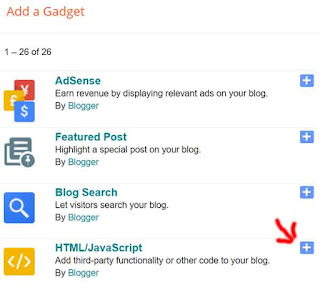
Figure out which area you want to post up your twitch tv stream embed and then click on the "Add a Gadget" link. That will create a pop up with many different gadgets to choose from on a list.  The gadget you need to use is "HTML/JavaScript", press the + sign to add that to your layout.


Step 4.

Enter a title and then paste the stream code from step 1 into the content box. After that press the save button and you should be able to see your twitch tv embed on your blog.


Update 6/10/2020 - Step 5.
Twitch has updated their embed code, everything is generally the same except that there is a parent parameter. So you have to change "www.example.com" to the URL of your website or blog.
Thursday, November 14, 2019

Buying reddit ads to promote streamers

Twitch buys reddit ads promoting streamers

So while visiting reddit this morning, I have seen a promoted thread by 'twitch' which says the following:


"I'm Nick Eh 30, a Canadian-born professional Fortnite streamer & creator. I'll be doing an AMA over in r/FortNiteBR at 1:30pm EST on 11/14. Get your questions ready, please and thank you!"

If you click on the link, it sends you to this URL:

https://www.twitch.tv/?rdt_cid=2754764246642879261

Which is odd because it doesn't send you to the subreddit nor to the Nick Eh 30 twitch page. I don't think I have seen any reddit ads similar to this before done by 'twitch'.  This maybe a new campaign push for Twitch using reddit ads to bring in more visitors over to the twitch platform. I will post up any other new twitch ads if I come across them on reddit.  If you happen to see anything unique in this front, please fill free to comment below. I think this is really interesting that twitch is pushing this way for advertising.

Another Ad from 'twitch" but its 22 days old can also be viewed in different subreddits.


Both Ads focus on the fortnite game and fortnite streamers. This ad was a video, didn't appear to have any upvotes and no comments.

The URL sends you to the Twitch but also has tons of extra parameters.

https://www.twitch.tv/?%243p=a_reddit&_branch_match_id=723473051234974098&ttid%3Deab80f788b=&utm_campaign=Mediahub_REDDIT_Invite_RotationalMedia_Tracker&utm_medium=paid%20advertising&utm_source=Reddit&~campaign_id=762653270706564461&~creative_id=765558173245671464

What is interesting here is the "Mediahub" parameter. Mediahub is a AD buying and planning agency. It appears twitch is using this company to advertise the platform across different websites and social media. The streaming platform war is starting to heat up and 2020 is going to be a very deciding year for all the platforms in this space.


11/22/2019 - Update on this post, another Twitch Reddit ad that is embedding the live stream of a certain streamer.


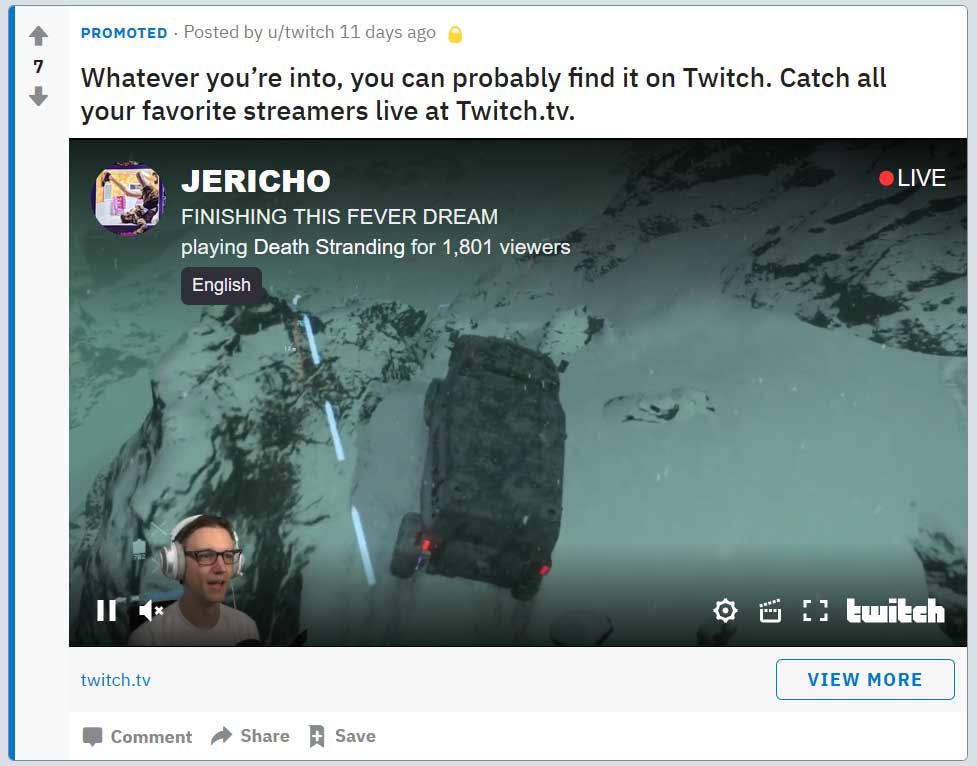
This is a really interesting ad because its doing a embed and not a image or video.  The streamer's live view count showed over 74,000+ at certain times. If they continue this embed ad and consistently use the "Lirik" channel as the embed, expect this channel views to compound higher.

Checking 3rd party stats, the "Lirik" channel generally has 100k to 180k video views. During this reddit ad embed, the video views has increased to 1.3 million views and followers for that day also tripled.

More Twitch Streamers have autoplaying embed ads on reddit, check out the following screenshots:

CohhCarnage


I didn't manage to get the screenshot during its live session, but this is also interesting to note here.  The ads are hardcoded with the streamer link, its not dynamic switching to other live streamers.

Nickmercs


DrLupo


Annemunition


Nickeh30


Jericho


There was also a ad for "Timthetatman" but I didn't manage capture that screenshot. This is pretty interesting list of streamers to pick from out of the platform. Tim's stream is marked as mature, so when that Ad with the autoplaying embed shows up, its a black screen pop up that people need to click in order for the stream to start up.

Twitch is spending alot of money on these reddit ads, and its a mix of general twitch ads and these focused autoplaying embeds for a handful of streamers.

------------

Update to this posting 11/26/2020

Just noticed another streaming ad on reddit but this time it was FB Gaming advertising.  Here is a screenshot of the ad post on reddit.

FB Gaming Ad reddit


Monday, August 26, 2019

WOW Classic launch breaks over 1 million viewers!

Amazing turn out for Blizzard's World of Warcraft classic launch on Twitch.  As of 6 PM EST, over 1 million viewers are watching streamers trying to play the game. 

Here is a screenshot of the top most streamers on Twitch who are currently streaming wow classic.

wow classic 1 million viewers


Top 5 Classic WOW Streamers include the following:
  1. Asmongold - 220k
  2. sodapoppin - 97.8k
  3. Method - 45.4k
  4. shroud - 45.1k
  5. ZeratoR - 34.1k
Sadly so far from what I have seen the World of Warcraft classic servers are not able to handle the load of players. Huge queue wait times, then when people are in the game its really laggy and rubber banding all over the place.

Its going to be very interesting to see how the viewership on Twitch is going to hold out for wow classic.  Usually new games get a pop up in views for the first day and then it starts to dip down in the following days.  I have a feeling things maybe alittle different in the case for wow classic. Their appears to be a synergy of personality streamers and wow players who view these streamers as they play the game themselves.  The race to level 60 is also going to take some time to achieve which is another viewer draw to streams.

This whole event for me personally is something I cant understand. I use to play WOW back in 2006 and was very active in PVP.  I managed to become one of the first Warlocks on the server to get max pvp rank of High Warlord.

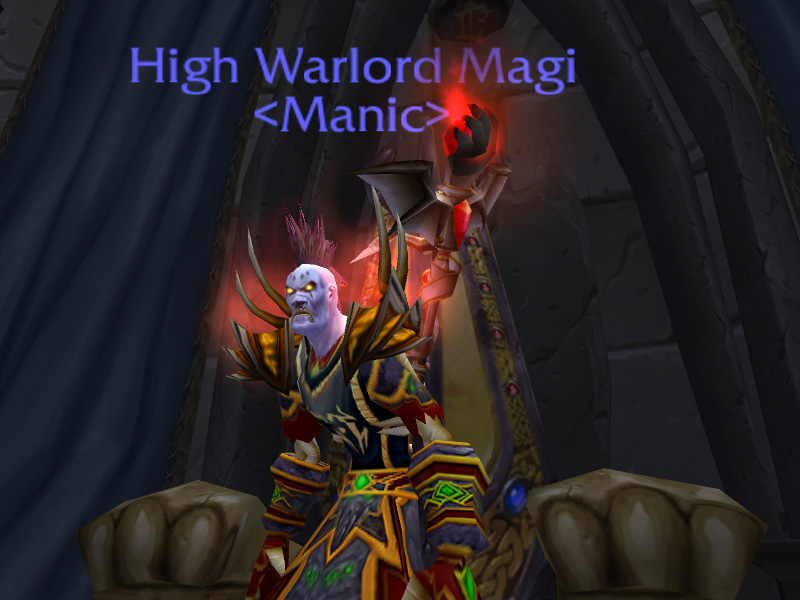
Here is my character with the high warlord tag.

high warlord magi

I don't have any itch to play world of warcraft again. Its pretty amazing to see so many have the opposite viewpoint.  But as time goes on I guess we will see if people stick with it or if this was one big gimmick that people quit in a week or two.
Thursday, June 27, 2019

Subscriber Only Streams feature in beta

Twitch just launched a new feature for streamers that allows them to set their channel to subscriber only mode for viewing.

It is currently in a beta phase, open to partners and affiliates who are eligible. The requirements to have this feature enabled on your account are as follows:
    audience everyone
  • Must broadcasted at least 90 unique days as affiliate or partner.
  • No Twitch TOS, Community Guideline violations in the same 90 day unique time frame.
Once you have the new feature available, you will see a new option show up on your creator dashboard under 'Stream Information" called audience. This is where you will have the ability to enable subscriber only mode for viewing.

 You have to set this option before you start streaming, it will not allow for changing during a active session.

Following are my personal opinions:

PROs for using subscriber only feature
  • Additional Monetization
  • Gated content barrier, due note their is a 5 minute preview window
  • Perk / Loyalty building
CONs for using subscriber only feature
  • First time viewers maybe turned off by paywall
  • Embedded streams on external websites will show splash subscriber screen, no preview with out login
Additional:

Subscriber streams have a special tag assigned to them which allows you to see all active streams that are currently in this mode.

Visit the following URL to see this in action:
https://www.twitch.tv/directory/all/tags/c22bdbea-f4f9-40b4-9f01-bd6f702a37f8

Notice: Many gaming companies such as Blizzard, Riot, Valve, CCP / EVE Online, CD Projekt Red and more have specific terms against using their IP behind paywalls. Make sure to review all video policies and obtain correct licensing/permission before using content from others in sub only mode.